NAG Helper · The Companion App

The NAG companion app.
Your war table between raids.

One dark, focused window beside the game: it reads your raid night live from your own combat log, writes your rotation from plain English, keeps every class key on one board, and carries your coaching, friends, and community with it.

Live Log analysis Read from your own combat log as you raid
English in Rotation builder Proven clauses out, written to the addon
1 board Keys war table Every class you own, one view
Log Analysis

Your raid night, read back to you. Live.

The companion app tails your own combat log while you play. By the time you leave the instance, the whole evening is already on the table — every pull, every wipe, every minute nobody was swinging.

Where the evening went 3:24:11

Half of the evening was not combat — and 55 minutes of it was dead air between pulls.

1:07:12 Boss combat
34:48 Trash
30:40 Runbacks
55:05 Idle
Every wipe, explained

Each wipe unfolds into what broke first: the missed interrupt, the cooldown that was still ticking, the ten seconds the tank stood alone.

Player deep dives

Open any raider and walk their night pull by pull — uptime, deaths, decisions — without leaving the table.

An analyst you can question

Ask why in plain language. The analyst answers from your log, not from a guide, and shows the moments it is pointing at.

Warcraft Logs, one click away

Every fight links straight to its Warcraft Logs report when you want the raw parses behind the reading.

Rotation Builder

Say it in English. Ship it to the addon.

The rotation coach speaks your language. You describe the behavior you want; it proposes the exact clause, proves it compiles, and writes it into your addon rotation — with a full paper trail and a one-click way back.

You Keep Slice and Dice up, and only Envenom at five combo points.
NAG
actions+=/envenom,if=combo_points=5&buff.slice_and_dice.up

Compiles cleanWritten to Assassination · change #418Undo · 1 click

The exact clause, proposed

Plain English in, one precise rotation clause out — no syntax to learn before you can change how you play.

Proven before it lands

Every proposal is compiled against your rotation first. Nothing broken ever reaches the addon.

Written to the addon

Accepted clauses are written straight into your installed rotation. Log in and it is already there.

One-click undo, full provenance

Every change is numbered and reversible. You can always see what changed, when, and why — and step back.

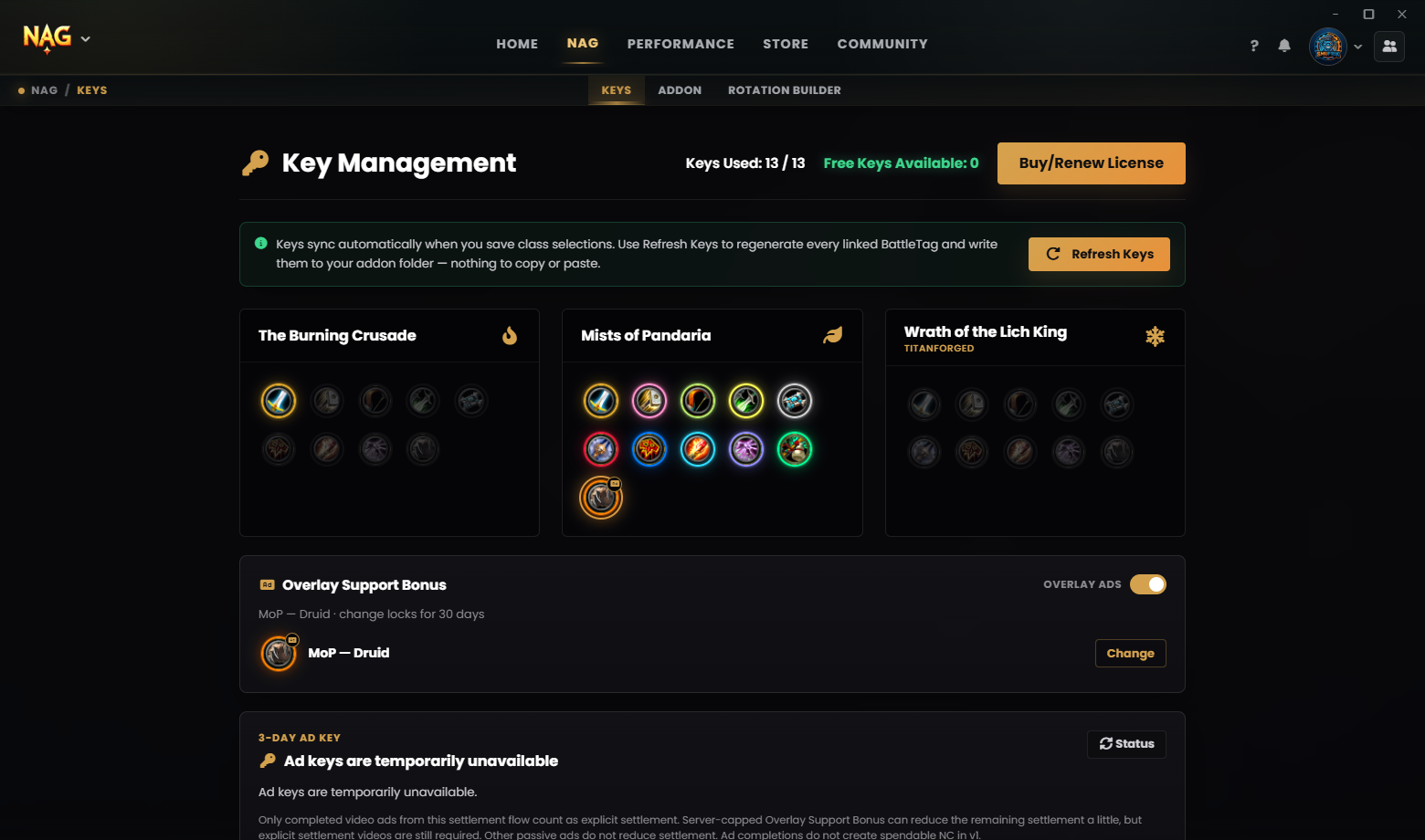
The Keys War Table

Every class you own, on one board.

Class access lives on a single war table: assign keys across expansions, move them between mains and alts, and share spare capacity with friends and guildmates — what is lit is what is playable.

The keys war table in the NAG companion app, showing class keys assigned across expansions
The war table, captured live from the companion app.

Beside the game

Always at hand. Never in the way.

The companion app is built to disappear while you play — and to be one keystroke away when you need it.

Alt + Shift + N In-game overlay Summon the companion app over WoW without alt-tabbing, and dismiss it just as fast.
Gameplay-safe Auto-updates Updates stage quietly in the background and never interrupt gameplay — they apply between sessions.
One click Addon install & repair Install, update, and repair the NAG addon on stable, beta, or alpha channels.

Community, carried with you

The people are part of the table.

Coaching marketplace

Find verified coaches, chat before you book, pay securely with NAG Credits, and leave a review when the session lands. Your leaderboard standing, friends, and messages live in the same window.

Booking, payment, and session management remain in NAG Helper.

Creator & partner program

Guide writers, coaches, and referral partners earn a progressive revenue share that climbs as the audience they bring grows. Every track gets a creator profile, a creator code, and approved brand assets.

Referral tracking and payouts stay in NAG Helper.

Apply early on Discord
NAG creator hub banner

Free to install

Put the companion app on your desk.

Download NAG Helper, sign in, and point it at your World of Warcraft installation. The addon, your keys, and your first log reading are minutes away.