
Read the encounter
Know what changed.
Cooldowns, resources, auras, procs, target conditions, and encounter timing feed the same decision surface.
NAG watches the combat state that matters and surfaces one clear recommendation in your WoW UI. You decide when to act.
Display-only guidance. Every action remains yours.
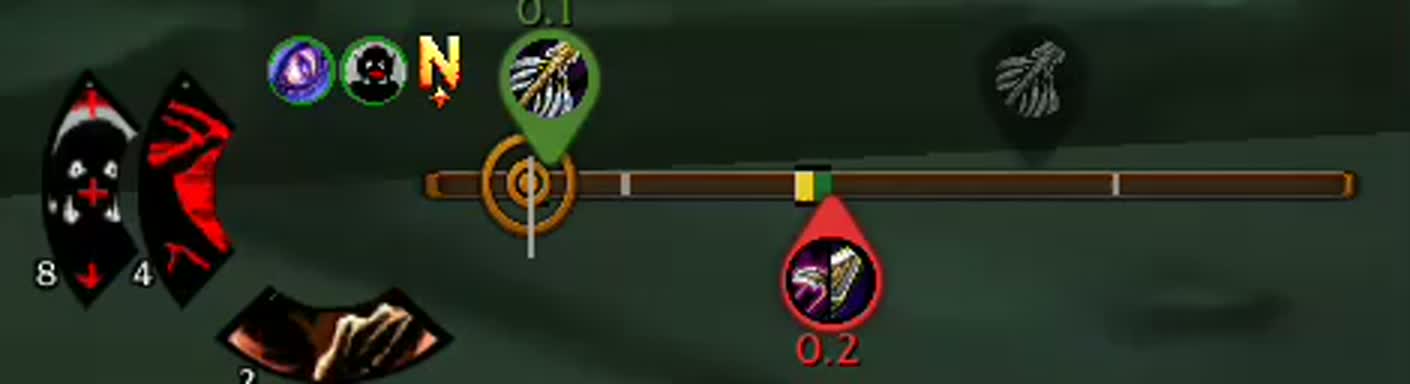
NAG continuously resolves the fight into a recommendation you can read without leaving the encounter.
Read the encounter
Cooldowns, resources, auras, procs, target conditions, and encounter timing feed the same decision surface.
Evaluate the rotation
Your Action Priority List is checked against the current state so the first valid action rises to the top.
Surface the next action
The primary recommendation and supporting timing cues stay in your field of view while you remain in control.
Deep enough for class specialists. Quiet enough to disappear into the pull.
Combat awareness
Action surface
Class craft
Expansion-aware Classic rotation guidance.
Deep rotation library for rune-based combat.
Advanced weave and timing support.
Coverage across the full class roster.
Monk and healing-state support included.
Rotation depth varies by class and expansion. Check the latest class coverage in NAG Helper before assigning access.
NAG reads and displays. You decide and execute.
NAG never casts, moves, targets, or presses a key for you. Read the NAG story.
Everything needed to move from evaluation to installation.
No. NAG only displays guidance. It never presses a button, casts a spell, moves your character, or makes the decision for you.
One key unlocks one class in one expansion across the characters on your account. Assign and manage access in NAG Helper.
Yes. Every supported expansion requires class access for full recommendations, including Classic Era and Season of Discovery.
Yes. NAG supports Action Priority List rotations, WowSims imports, and an in-game rotation editor on supported versions.
Download NAG Helper, sign in, and point it to your World of Warcraft installation. Helper installs, updates, and repairs the addon and manages your class access.
Choose the class capacity you need, then use NAG Helper to install the addon and assign access.
Purchase on the website. Install and manage access in NAG Helper.